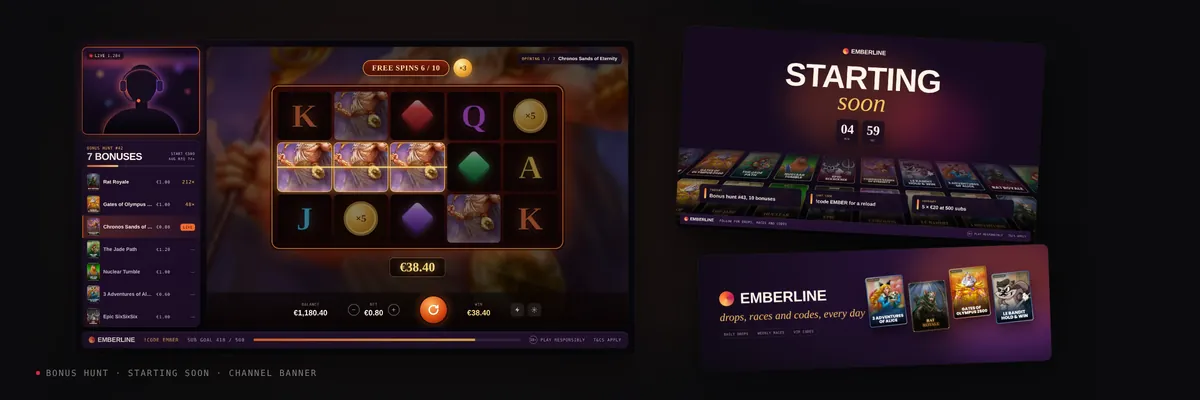
Casino stream overlays are the scenes, frames and panels that sit on top of a slots stream: the live layout around the gameplay, a bonus hunt tracker, a code ticker, alerts and the starting soon, BRB and ending screens. We design complete overlay kits on a 1920x1080 canvas for OBS and Streamlabs, delivered as transparent PNG and WebM files, for casino streamers and for operators and affiliates who sponsor them. Kits start from EUR 190.
What goes in a casino stream overlay kit
A kit is everything a streamer needs to go live with a consistent look, from the first "starting soon" minute to the ending screen. Our standard kit includes:
- Live scene with a webcam frame, a gameplay area and space for chat, sized so the slot's reels and balance are not covered.
- Bonus hunt tracker listing games, bet size and multiplier, with a running total.
- Code ticker showing the sponsor code and the !code chat command.
- Sub/follow goal bar styled to match the scene.
- Starting soon, BRB and ending screens with countdown and social handles.
- Alert frames for follows, subs and tips.
- Panels for the channel page (Twitch panels are 320 px wide) and an offline banner.
Every kit is built around one brand system, so the tracker, ticker and alerts look like they belong together rather than coming from three different template packs.

Overlay sizes and file formats
Overlays are delivered as transparent PNG for static layers and WebM with alpha for animated ones, so they drop straight into OBS or Streamlabs as image and media sources. Files are named consistently and delivered as a download link.
| Element | Size (px) | Format |
|---|---|---|
| Live scene / full overlay | 1920x1080 | Transparent PNG or WebM |
| Starting soon, BRB, ending | 1920x1080 | PNG or looping WebM |
| Webcam frame | Sized to your camera layout | Transparent PNG |
| Bonus hunt tracker | Panel inside the 1920x1080 scene | PNG background or HTML browser source |
| Code ticker and goal bar | Strip inside the scene | Transparent PNG or WebM |
| Alert frames | Sized to the alert slot | Transparent PNG or WebM |
| Twitch panels | 320 wide | PNG |
| Offline banner | 1920x1080 | PNG |
Layered source files are available on request, so your designer or the streamer's editor can make small changes later.
Bonus hunt overlay and tracker
The bonus hunt overlay is the part of a slots stream viewers read most. During a hunt the streamer collects bonuses across several games, then opens them one by one, and the audience wants to see the list, the bet on each game and the multiplier as it lands.
We design the tracker in two ways:
- As a static PNG panel with a styled table that the streamer fills using text sources in OBS. Simple, and works with any setup.
- As an HTML browser source that the streamer updates during the stream. Games, bets and multipliers sit in clean rows, and the panel keeps its styling however many games are in the hunt.
Either way, the bonus hunt tracker uses the same fonts, colours and frame as the rest of the scene. Game names stay readable when the stream is watched on a phone, which means a minimum text size and no thin script fonts in the table.
If the streamer already uses a bonus hunt tool, we style the panel to sit around it in the same frame, or deliver a static layer a moderator updates by hand. Kits also export at 1920x1080 for YouTube simulcasts.
Tip: check your live scene at phone size before you go live. A large share of viewers watch on mobile, where a 1920x1080 frame shrinks to a few centimetres. If the code ticker or the tracker multipliers are not readable on a phone screenshot, they are too small. We test every kit this way before delivery.
Kick stream overlay vs gambling stream overlay on Twitch
Both platforms run the same 1920x1080 canvas, and the same OBS or Streamlabs scenes work on either. The differences are about rules, not pixels.
Kick allows slot streams, so a Kick overlay is usually the main deliverable for casino streamers and sponsors. Kick has its own rules on gambling content, which can change, so the streamer and sponsor should check them before a campaign.
Twitch restricts gambling content and only allows it in certain cases. Before planning a gambling stream overlay for Twitch, check Twitch's current policy and whether your brand and licence fall within what it permits. Many streamers use Twitch for other content and keep slots streams on Kick. In that case the kit can be split: panels and an offline banner for Twitch, the full live kit for Kick.
We design the overlays. Streamer management, platform compliance and the stream itself stay with you.
Branding rules for sponsored streams
Operators and affiliates who sponsor streamers need the brand to show up correctly without taking over the stream. Overlays for sponsored streams follow a few rules:
- Agree the sponsor zones. Logo placement, code ticker and any promo strip get fixed positions in the scene, away from the reels and balance.
- Use the brand system as supplied. We follow your logo, colours and type rules, and build any game art from each provider's official marketing kit without redrawing or altering provider logos.
- Make the code legible. The sponsor code and !code command must be readable at phone size, since the code is often the main point of the sponsorship.
- Carry the 18+ and responsible-gambling lines. Every sponsored scene includes the lines your licence requires, in a fixed spot that stays on screen.
- Keep one kit per streamer. Each streamer gets their own variant on your brand system, so their identity stays visible and the sponsor stays consistent across the roster.


Sponsors running several streamers often pair the kit with matching social posts for stream announcements and tournament graphics for community races.
OBS overlay for casino streamers: how files are set up
Each kit is organised by scene, so importing it into OBS or Streamlabs is straightforward. A typical folder holds one set per scene (starting, live, hunt, BRB, ending), the alert files, the panels and a short note on layer order. Animated elements are short loops in WebM with transparency, kept light so they do not strain the encoder.
File names follow one pattern across every size and variant, which makes it easy to swap a seasonal version in without rebuilding scenes. If you also send email or lobby campaigns, the same artwork can feed your promo banners and email templates.
Pricing and turnaround
A stream overlay kit (live scene, bonus hunt tracker, starting soon, BRB, ending and alert frames) starts from EUR 190. Extra streamer variants, seasonal refreshes and localised text are quoted per kit, with localisation from EUR 8 per language per asset.
On a retainer, the Growth plan (EUR 1,290 per month) includes a stream refresh 4 times a year and the Pro plan (EUR 2,490 per month) a monthly refresh. Prices are in EUR and invoiced in EUR, paid in crypto only (USDT, USDC, BTC, ETH, SOL and others). See all plans on the pricing section or how a project runs on how we work. You can reach us on Telegram at @BarisThumbs.
Casino stream overlay questions
How much does a casino stream overlay kit cost?
A full kit with live scene, bonus hunt tracker, starting soon, BRB, ending and alert frames starts from EUR 190. Payment is in crypto only.
Which formats do you deliver?
Static layers come as transparent PNG and animated layers as WebM with transparency, on a 1920x1080 canvas. Tracker panels can also be built as an HTML browser source.
Do the overlays work on both Kick and Twitch?
Yes, the same OBS or Streamlabs scenes work on both. Twitch restricts gambling content to certain cases, so check its current policy before streaming slots there.
Can the bonus hunt tracker be updated live?
Yes. We can build it as an HTML browser source that the streamer updates during the stream, or as a styled PNG panel filled with OBS text sources.
Do you manage streamers or run the stream?
No. We design the overlays. Streamer management, platform rules and the stream itself stay with you.
Do sponsored overlays include compliance lines?
Yes. Every sponsored scene carries the 18+ and responsible-gambling lines your licence requires, in a fixed position that stays on screen.
Send your channel. Get a quote for your overlay kit.
Message us on Telegram or email support@casinothumbnail.com with your Kick or Twitch channel and the casino brand you stream for. We reply with a scope, a price and a delivery date.